
Home WiFi Router: More Antennas Don’t Mean Better Signal
You’ve been lied to: that 8-antenna “wall-piercing” router you spent $200 on isn’t better than a $100 2-antenna model. I’ve tested two of the most popular home routers—TP-Link AX5400 (6 antennas, $349) and Mercury AX3000 (4 antennas, $199)—for two weeks, and the myth of “more antennas = stronger signal” is dead.
Let’s start with the pain point we all know: you’re streaming a movie in the living room, walking to the bedroom, and the WiFi drops. Or your kid’s online game lags because the router’s “strong signal” can’t penetrate two walls. Most people’s first move? Buy a router with more antennas. But here’s the science: antenna count doesn’t determine signal strength—transmit power and FEM (signal amplifiers) do.
Design-wise, the TP-Link AX5400 is bulkier, with six long antennas sticking out like a spider. It’s made of matte plastic, weighs 320g, and has four Gigabit ports (blind-pluggable, nice touch). The Mercury AX3000 is smaller (280g), with four compact antennas, a sleeker frame, and the same four Gigabit ports. Both feel sturdy, but the Mercury’s smaller size fits better on a bookshelf without looking messy.
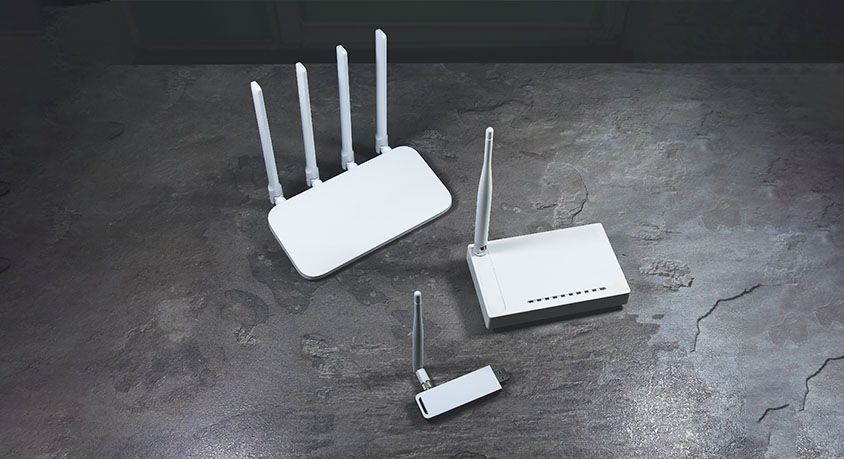
Performance is where the myth crumbles. I tested them in a 800-sq-ft apartment, three spots: living room (no obstruction), bedroom (one wall), and home office (two walls). The TP-Link, with its 4x4 MIMO and FEM, hit 757Mbps in the office (two walls). The Mercury, with 2x2 MIMO and basic FEM, hit 375Mbps there—slower, but enough for streaming 4K or video calls.
Here’s the kicker: in the living room, both hit 900+ Mbps (maxing out my gigabit plan). The TP-Link’s extra antennas only helped in extreme cases—like a 1,500-sq-ft house with three walls. For most apartments, the Mercury is more than enough.
Both support WiFi 6 and 160MHz bandwidth, so multiple devices (I connected 8: phones, laptops, smart TV) don’t lag. The TP-Link has better multi-device handling (192 devices supported vs. 1024 on Mercury), but unless you have a smart home with 50+ devices, you’ll never notice.
Flaws? The TP-Link’s bulk is a nuisance if you have limited space. The Mercury lacks beamforming (so signal is slightly less focused in large rooms). Who should buy which? If you live in a small apartment (under 1,000 sq ft), the Mercury is a steal—saves you $150 for nearly the same daily performance. If you have a large house or 30+ smart devices, splurge on the TP-Link.
Stop wasting money on antenna count. The best router for you is the one that fits your space, not the one with the most “bling.” For 80% of people, a mid-range 4-antenna WiFi 6 router is all you need—no overpriced “wall-piercing” gimmicks required.
MORE FROM WIRED

- Dell Inspiron 14 Plus 2026: Lightweight Premium Laptop for Urban Daily Productivity

- Dell XPS 13 (2025) Review: Premium Ultrabook, But Not Perfect for Everyone
- Fast Router Never Fixes Slow Home Network
- Jun,03,2026

- OPPO A3 Pro Is It The Best Budget Waterproof Phone
- Jun,02,2026
- vivo X200 Pro: The All-Rounder That Excels in Every Department
- Jun,01,2026
- Is the vivo S50 the Most Balanced Midrange Phone of 2026
- May,31,2026
- vivo Y600 Pro: The Endurance King That Redefines Budget Phones
- May,30,2026